Skip to content

Run the freight desk. Not the inbox.

Keep every inquiry, quotation and job in one place, and print the quotation, CAN and BL in your company's name.

  • 30 days free
  • No card
  • Your data is never deleted
Follow one rate through a normal day

What you get on day one

30 days
free, and no card asked for
4 documents
Quotation, CAN, Seaway BL and Payslip, as PDFs in your name
36 ports · 18 lines · 8 airlines
loaded the day you sign up
6 roles
so sales sees only its own inquiries

Your current workflow

Follow one freight rate through a normal day.

From a WhatsApp forward to a printed BL. Scroll, and watch where it gets typed again.

Skip the story
Start 30-day free trial

30 days free · no card · your data is never deleted

  1. A rate lands on WhatsApp. Maersk · Mundra → Jebel Ali · USD 450 / 20' · valid till Friday
  2. Someone copies it into a sheet. rates_FINAL_v3 (2).xlsx, tab “Rates Sept (2)”, row 214.
  3. Then types the customer again. And again. One customer, four spellings. Every CAN, BL and invoice adds another.
  4. “Which rate did we give them last time?” The lookup breaks on a spelling. The answer is somewhere in a chat.
  5. Now type it once. One inquiry, entered one time.
  6. It becomes Inquiry #1. Customer, route, cargo, volume, line and rate, in one place.
  7. The quotation, job, CAN and BL reuse it. Same spelling on every page, printed in your company’s name.
  8. Same desk. One record.

Before → after

Find the rate you quoted, without scrolling a chat.

Nobody loses a shipment. You lose last month's rate, and the afternoon spent retyping the consignee.

TodayWhatsApp · Excel · Word
  • CANPATEL AGRO EXPORTS
  • BLPatel Agro Exp.
  • InvoiceM/s Patel Agro

The rate sits in a chat, the total in a sheet, and the consignee is typed again on every document.

With the CRMInquiry #1 · sample data
Customer
Patel Agro Exports
Route
Mundra INMUN → Jebel Ali AEJEA
Cargo
Cumin Seeds
Volume
2 x 20 FT
Shipping line
Maersk
Rate quoted
USD 450 / 20'
Status
Booked
Logged
40 days ago

Carried to

  • Quotation
  • Job
  • CAN
  • Seaway BL

Typed once at the inquiry. The quotation, the job, the CAN and the BL all reuse it.

Product tour

Follow one shipment from inquiry to invoice.

These are the real screens, with the sample data every new account can load. Click a screenshot to see it full size.

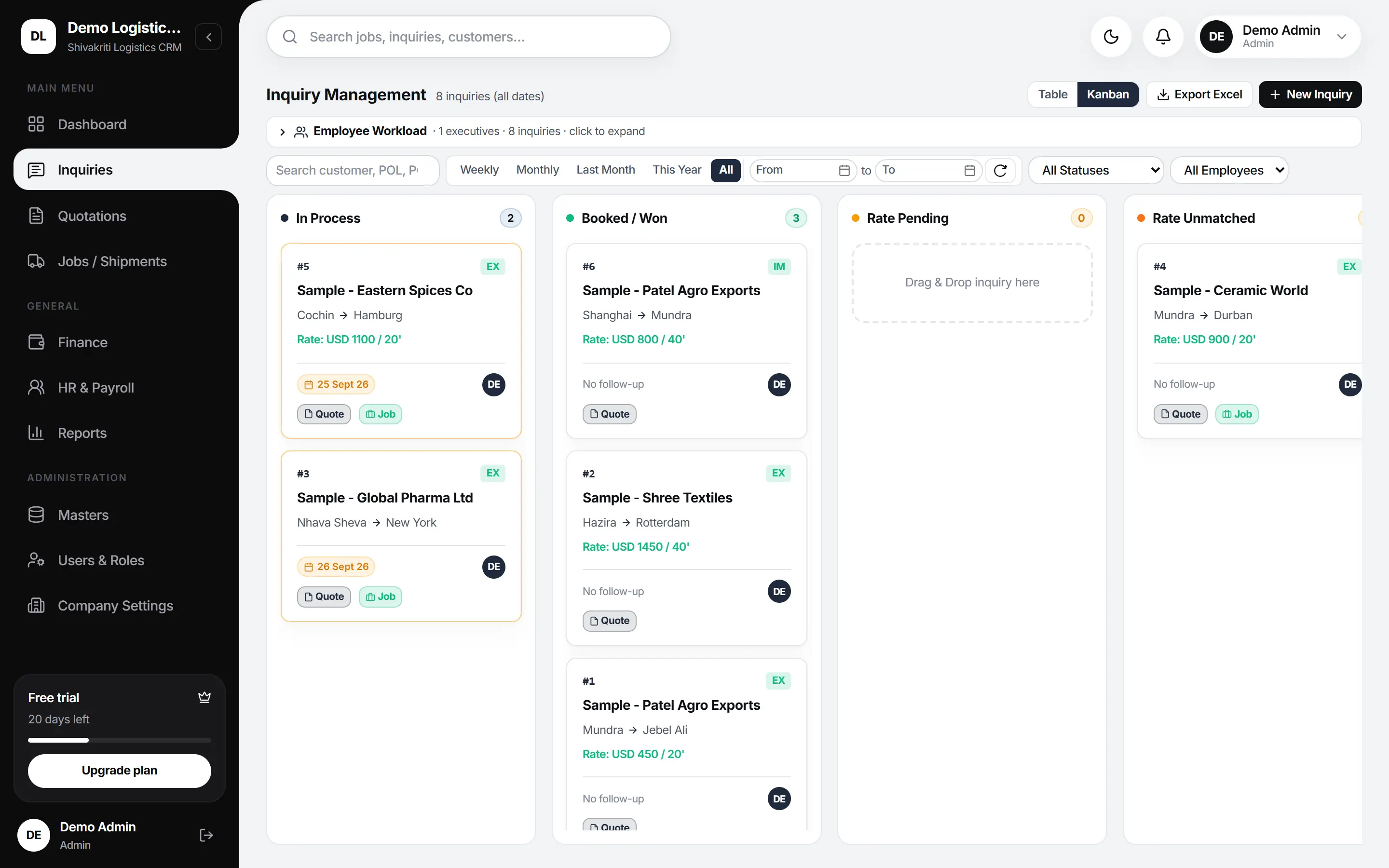
Step 1 of 5 · Inquiry

Every enquiry on one board, from first call to booked.

Drag a card from In Process to Booked. Filter by week, month, status or the person chasing it.

  • Table or Kanban view, with an Excel export
  • Follow-up dates that show up when they're due
  • One click turns an inquiry into a quotation or a job
The inquiry Kanban board with cards in In Process, Booked / Won, Rate Pending and Rate Unmatched

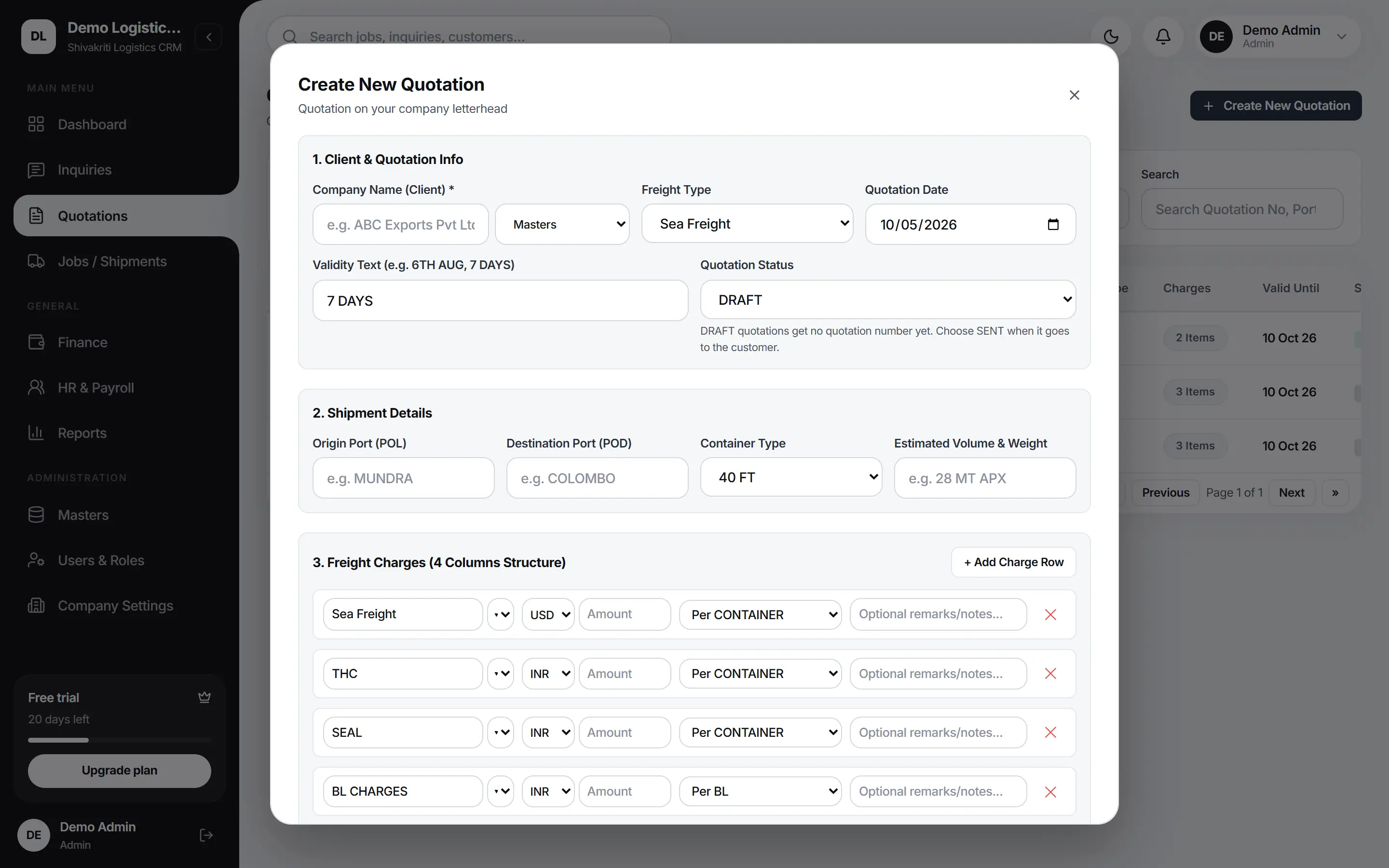
Step 2 of 5 · Quotation

Charge heads in USD and INR, on your letterhead.

Ocean freight in dollars, THC and BL charges in rupees. The quotation prints as a PDF in your company's name.

  • Sea or air freight, per container, BL, CBM or KG
  • Drafts stay unnumbered until you send them
  • E-mailed to the customer from the CRM
The Create New Quotation form with client details, freight type, shipment details and charge rows in USD and INR

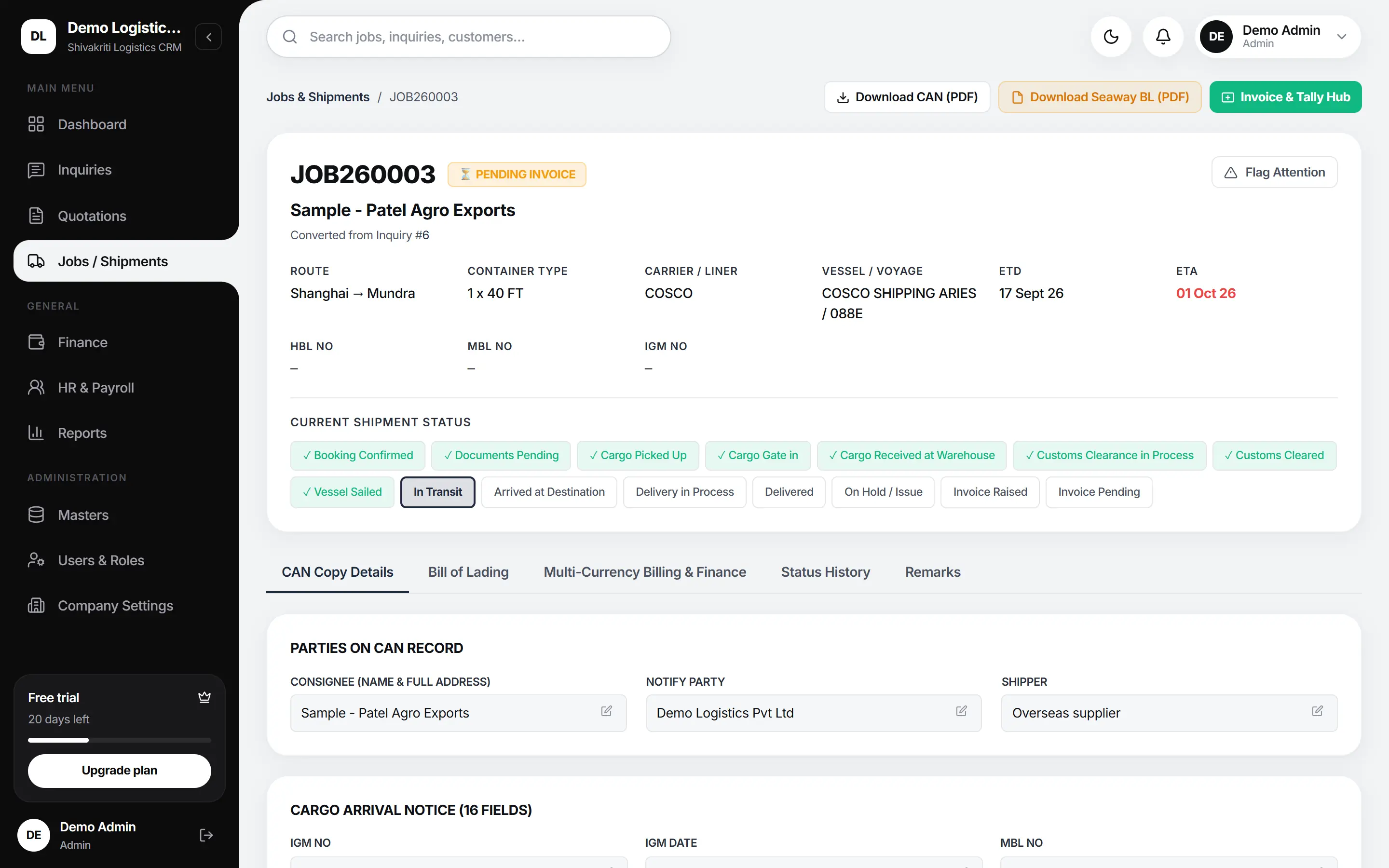
Step 3 of 5 · Job

Where the shipment is, without ringing anyone.

The status line moves with the job, from booking to delivered. Overdue ETAs turn red on the dashboard.

  • Carrier, vessel, voyage, ETD and ETA on the job
  • IGM, MBL and HBL numbers kept for the CAN
  • Status history shows who changed what
A Shanghai to Mundra job with carrier, vessel and voyage, ETD and ETA, HBL, MBL and IGM fields, and the shipment status line

Step 4 of 5 · Documents

The CAN and BL print from the job you already filled in.

Nothing is typed twice. The consignee on the CAN is the consignee on the BL.

  • 4 PDFs: Quotation, CAN, Seaway BL and Payslip
  • Your logo, address, GSTIN and PAN on the letterhead
  • Your MTO licence number on the Seaway BL
See all 4 documents
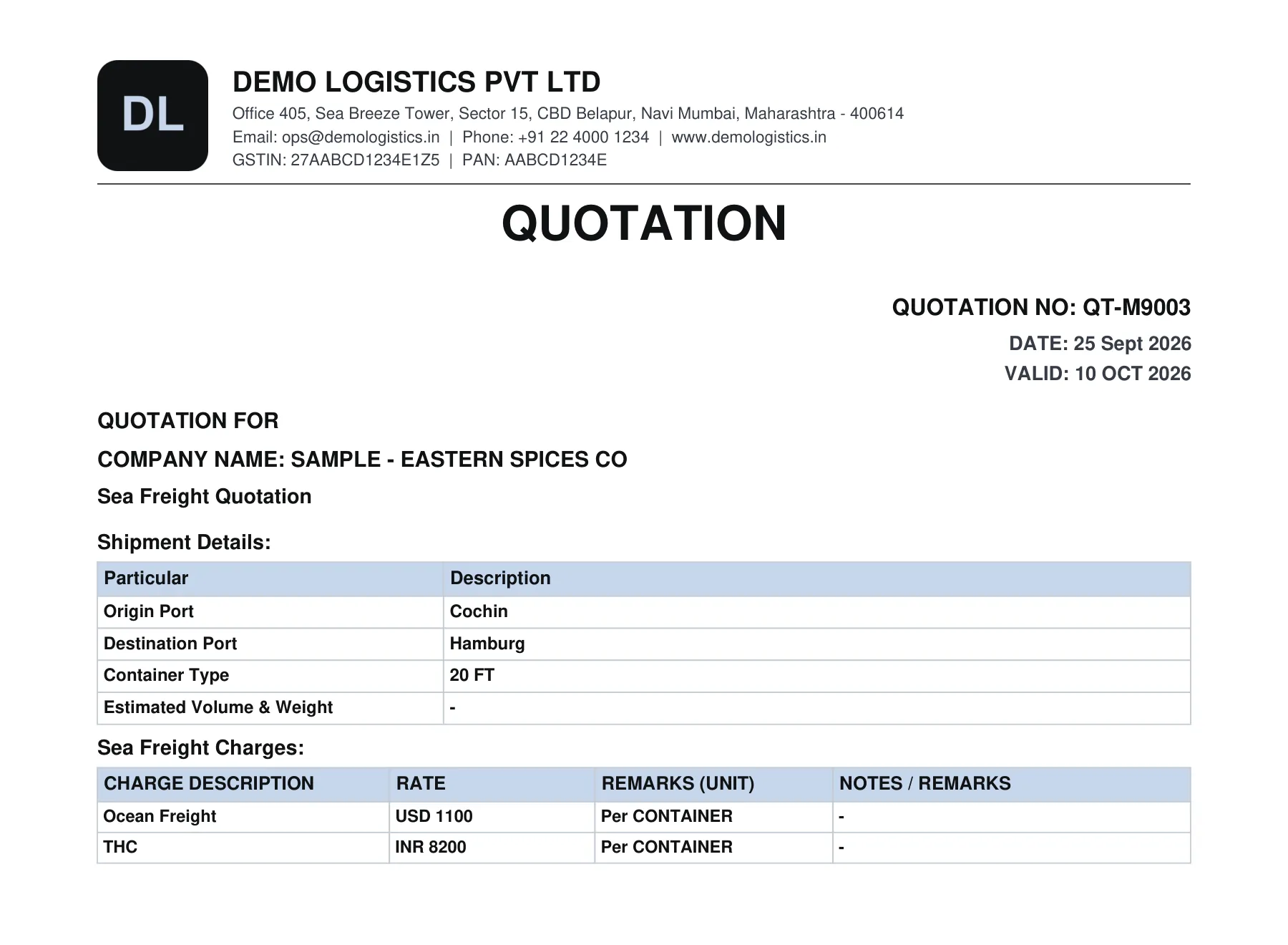
A quotation PDF with a company letterhead, GSTIN and PAN, shipment details and a charge table

Step 5 of 5 · Finance

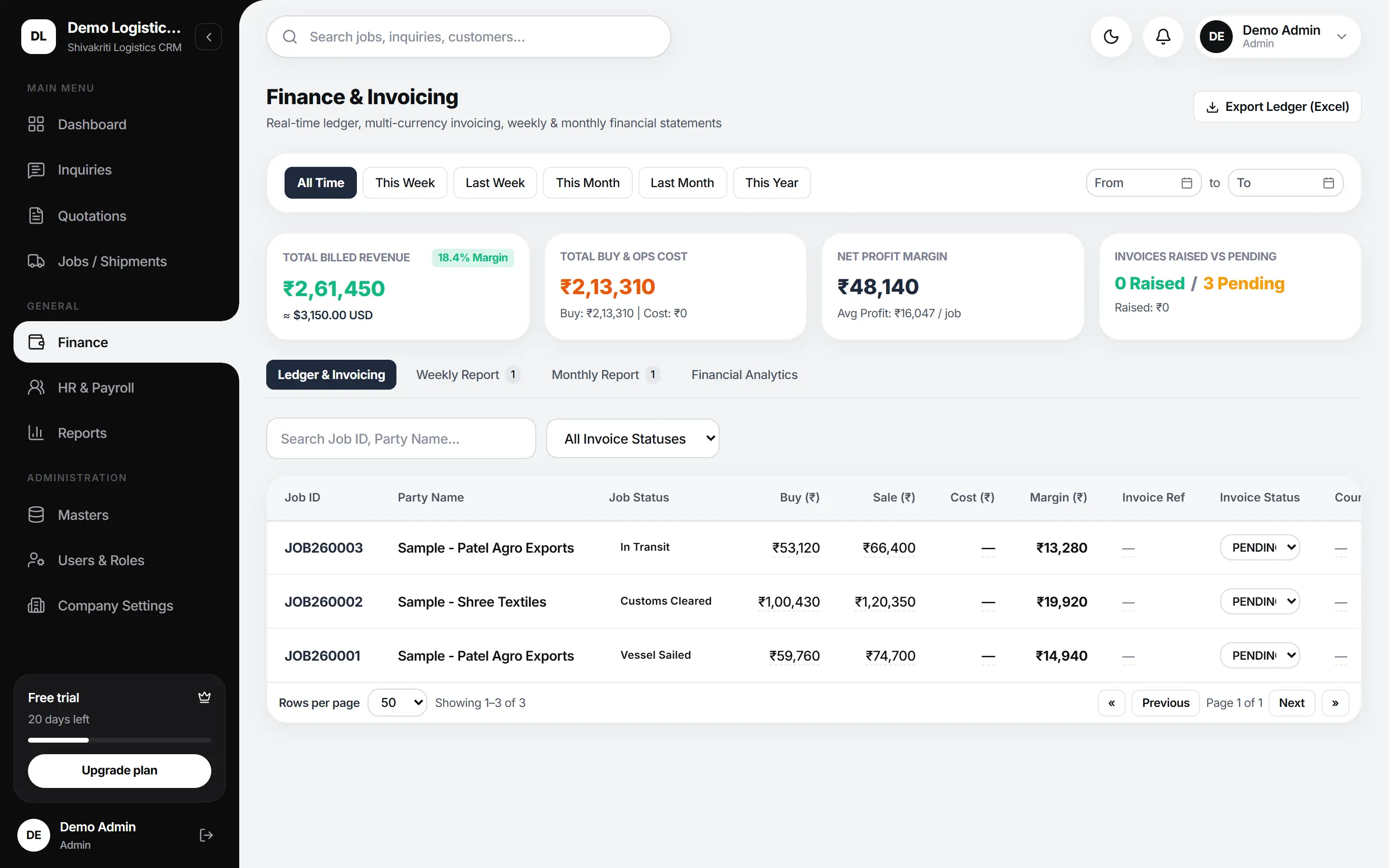
What each job made you, and what's still unpaid.

Buy, sale and margin per job in rupees, with the USD figure beside it.

  • Ledger exported to Excel in one click
  • Weekly and monthly statements
  • Invoice status per job: raised or pending
The finance ledger with billed revenue, buy and ops cost, net margin, and buy, sale, margin and invoice status per job

One job, 4 documents

Your letterhead, not ours.

Fill in your logo, address, GSTIN, PAN and MTO licence once. Every document prints in your company's name, and none of them says Shivakriti.

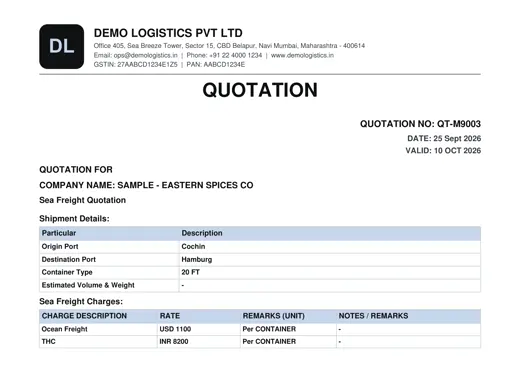
The Quotation PDF with sample data
The Quotation PDF, with sample data

Quotation

Sea or air freight, charge by charge, with the rate in USD or INR and the unit beside it.

Carried onto the Quotation

  • Logo, company name, address, e-mail, phone and website
  • GSTIN and PAN
  • Quotation number, date and validity
  • Customer and freight type
  • Origin, destination, container type, volume and weight
  • Each charge with its rate, currency and unit
  • Routing, schedule, transit time and free days
  • Your notes and terms
Download sample PDF (11 KB)
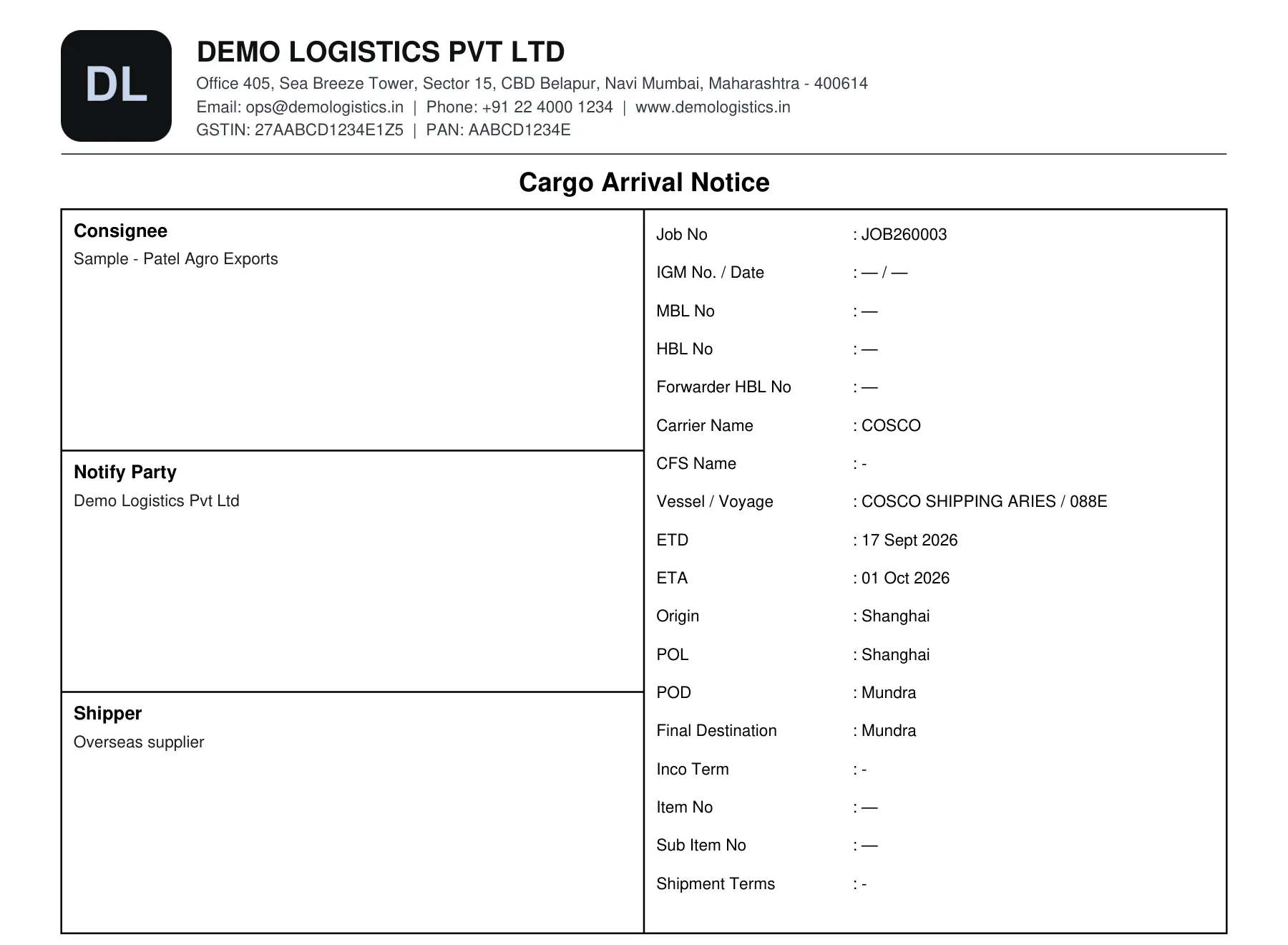
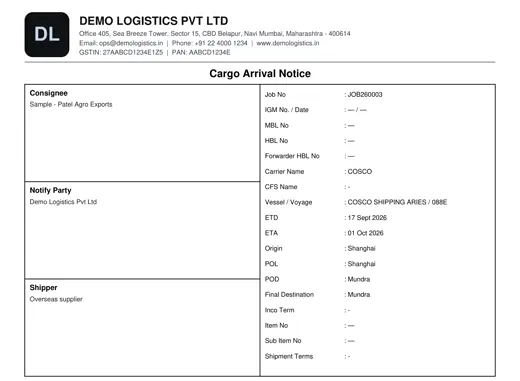
The Cargo Arrival Notice PDF with sample data
The CAN PDF, with sample data

Cargo Arrival Notice

Filled from the import job, so the IGM, MBL and HBL numbers are typed once.

Carried onto the CAN

  • Your letterhead: logo, address, GSTIN and PAN
  • Consignee, notify party and shipper
  • Job number, IGM number and date
  • MBL and HBL numbers, with dates
  • Carrier, CFS, vessel and voyage
  • ETD, ETA, origin, POL, POD and final destination
  • Inco term and shipment terms
  • Marks, description, container, seal, packages, weight and CBM
Download sample PDF (10 KB)
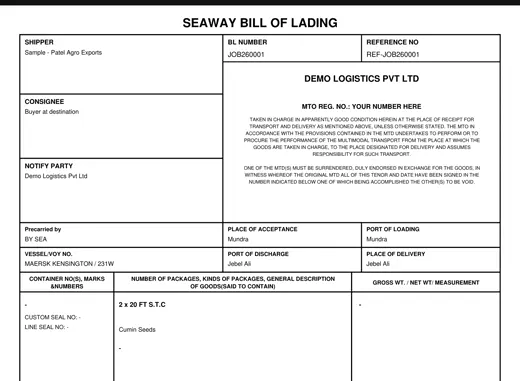
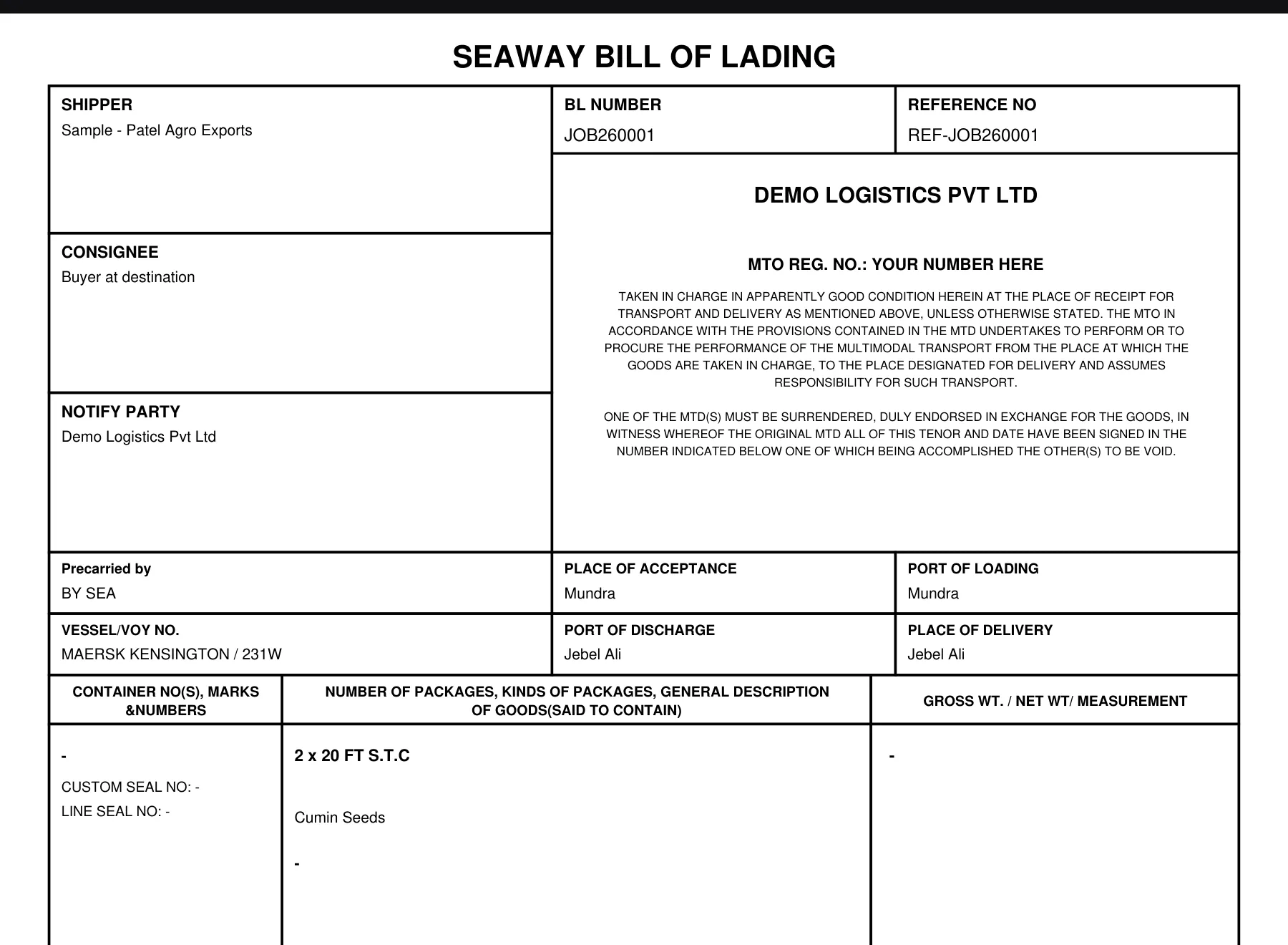
The Seaway Bill of Lading PDF with sample data
The Seaway BL PDF, with sample data

Seaway Bill of Lading

Issued in your company's name, with your MTO licence number at the top.

Carried onto the Seaway BL

  • Your company name and MTO licence number
  • BL number and reference number
  • Shipper, consignee and notify party
  • Place of acceptance, POL, vessel and voyage, POD, place of delivery
  • Container number, type, seal, gross and net weight, packages
  • Description of goods and measurement
  • Freight amount and where it's payable
  • Place and date of issue, authorised signatory
Download sample PDF (6 KB)
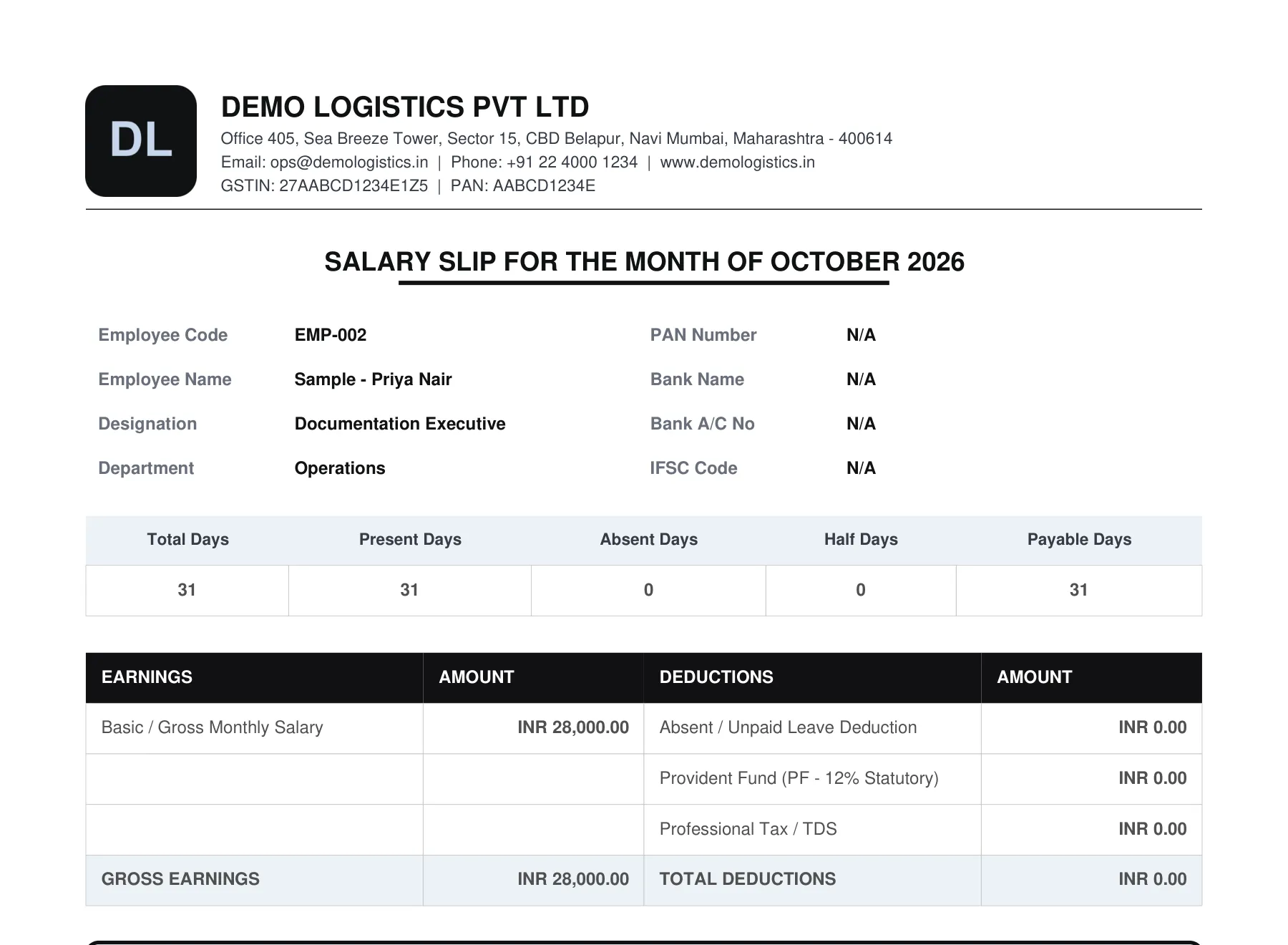
The Payslip PDF with sample data
The Payslip PDF, with sample data

Payslip

Made from attendance, with the net salary in figures and in words.

Carried onto the Payslip

  • Your letterhead
  • Employee code, name, designation and department
  • PAN, bank name and account number
  • Total, present, absent, half and payable days
  • Basic salary, bonus or incentive
  • PF, professional tax or TDS, and other deductions
  • Net salary in figures and in words
Download sample PDF (11 KB)

Sea · air · customs

Your lanes are loaded before your first quote.

36 ports, 18 shipping lines and 8 airlines come with every account. Add your own as you go; they belong to your company alone.

  • Sea freight

    FCL and LCL, per container or per BL. The liner, vessel and voyage sit on the job, and the CAN and Seaway BL print from it.

    • FCL / LCL
    • 20 FT · 40 FT · 40 HC
    • CAN
    • Seaway BL
    • 18 lines
  • Air freight

    Air freight quotations with charges per KG, in USD or INR. Airlines sit in your masters with their IATA codes.

    • Air quotation
    • Per KG
    • USD / INR
    • 8 airlines
  • Customs and transport

    Customs brokers, transporters and overseas agents are kept as masters. The IGM number and date go on the job and print on the CAN.

    • CHA
    • Transporter
    • Overseas agent
    • IGM
    • 2 ICDs

The lanes in your sample data

Every port carries its UN/LOCODE. 12 of the 36 are in India, including 2 ICDs.

  1. INMUN Mundra to AEJEA Jebel Ali

    Export · Cumin Seeds · 2 x 20 FT · Maersk

  2. INHZA Hazira to NLRTM Rotterdam

    Export · Polyester Fabric · 1 x 40 HC · MSC

  3. INNSA Nhava Sheva to USNYC New York

    Export · Pharmaceuticals (non-haz) · LCL 4 CBM · CMA CGM

  4. INMUN Mundra to ZADUR Durban

    Export · Ceramic Tiles · 5 x 20 FT · PIL

  5. INCOK Cochin to DEHAM Hamburg

    Export · Black Pepper · 1 x 20 FT · Hapag-Lloyd

  6. CNSHA Shanghai to INMUN Mundra

    Import · Packaging Material · 1 x 40 FT · COSCO

  7. INHZA Hazira to LKCMB Colombo

    Export · Cotton Yarn · 2 x 40 HC · ONE

  8. INMUN Mundra to SADMM Dammam

    Export · Sanitary Ware · 3 x 40 HC · Evergreen

Compared with how you work now

Made for the forwarding desk, not adapted to it.

Your sheet and your accounts package do their own jobs well. This is what changes when the desk works in one record.

How the CRM compares with Excel + WhatsApp, Tally alone, Generic sales CRM
What you needExcel + WhatsAppTally aloneGeneric sales CRMShivakriti
Inquiry pipelinePartly. A sheet and a chat historyNo. Not what it's forYes. Yes, for sales leadsYes. POL, POD, cargo and rate on each inquiry
Quotation on letterhead in INR + USDPartly. Typed up in Word or ExcelNo. Accounting vouchers, not freight quotesPartly. Generic quote templatesYes. Charge heads per container, BL, CBM or KG
CAN / BL from the jobNo. Retyped each timeNo. NoNo. NoYes. Filled from the job
Per-job marginPartly. If someone keeps the sheet currentPartly. With a cost centre per jobNo. Deal value, not buy and saleYes. Buy, sale and margin in INR and USD
Role-based visibilityNo. Whoever has the file sees it allYes. User security levelsYes. YesYes. 6 roles; sales sees only its own
Setup timeYes. Already in useYes. Already in usePartly. Custom fields for ports and containers firstYes. Same day; ports and lines preloaded
PriceYes. Already paid forYes. Licence you already ownPartly. Usually per user, per monthYes. One plan per company, users included

How it works

Live by this afternoon.

No demo call to sit through, no consultant and no setup fee. The CRM is yours a minute after you sign up.

  1. Sign up

    Your e-mail, a 6-digit code, and you're in. 36 ports, 18 shipping lines and 8 airlines are already loaded.

  2. Put your name on it

    Add your logo, address, GSTIN, PAN and MTO licence in Company Settings. Your paperwork is ready.

  3. Bring your team in

    Add staff as Sales, Finance, Operations or Quotation. Each person sees only what their job needs.

Pricing

One plan per company, users included.

Pay yearly and get up to 3 months free. GST of 18% is added at checkout. The first 30 days cost nothing.

Billing period
  • Starter

    A small team finding its feet.

    ₹8,333 / month

    ₹9,999 / month

    ₹99,990 + GST for 12 months: 2 months free.Per company, billed monthly + GST.

    • Up to 5 usersIf you want us to onboard your data, then contact us. One-time onboarding: ₹25,000.
    • Extra users at ₹799 a month each
    • Inquiries, quotations and jobs
    • CAN, Bill of Lading and quotation PDFs
    • Finance, reports and payroll
    • E-mail support
    Start 30-day free trial
  • Scale

    A large desk or several teams.

    ₹42,307 / month

    ₹54,999 / month

    ₹5,49,990 + GST for 13 months: 3 months free.Per company, billed monthly + GST.

    • Up to 40 usersIf you want us to onboard your data, then contact us. One-time onboarding: ₹1,50,000.
    • Extra users at ₹599 a month each
    • Everything in Growth
    • Phone support
    • Help setting up your letterhead and numbering
    Start 30-day free trial
  • Enterprise

    Several branches, one CRM.

    Contact us

    Priced for your team and branches.

    • More than 40 users
    • Everything in Scale
    • Onboarding planned with you
    Contact us

Questions

Straight answers before you sign up.

What happens after the 30 days?

The CRM locks until you subscribe. You can still sign in and reach the payment page. Nothing is deleted, and paying switches everything back on at once.

How much does Shivakriti Logistics CRM cost?

Starter is ₹9,999 a month for up to 5 users; Growth is ₹24,999 a month for up to 15 users; Scale is ₹54,999 a month for up to 40 users. Extra users cost ₹799, ₹699, ₹599 a month respectively. Paying yearly gives 2 months free on Starter, 3 months free on Growth, 3 months free on Scale. GST of 18% is added. Enterprise, for more users or several branches, is priced on request.

Can I get a refund?

No. Payments are non-refundable, which is why the first 30 days are free with no card: you can try everything before paying. Plans never renew by themselves, so you can stop at any time by not paying for the next period.

Where is my data stored?

In India: the database runs in Mumbai. Each company's records are kept separate, connections are encrypted, and your data is never sold or used for advertising.

Do I need a card to start?

No. The trial asks for your company name, your name, your e-mail and a password. Nothing else.

Can another company see my data?

No. Every record carries the company it belongs to, and every query is scoped to your company in the data layer. The database refuses a record written without one. This is checked by automated tests on every release.

Will the documents have your name on them?

Never. The quotation, CAN and payslip carry your logo, address, GSTIN and PAN. The Seaway BL carries your company name and MTO licence number.

Can my sales people see everything?

Only if you let them. Sales staff see their own inquiries, jobs and quotations by default. There are 6 roles, and you can set view, add, edit and delete rights for each person, module by module.

Can I bring in what I already have?

Yes. Customers, ports, shipping lines, CHAs, transporters and agents live in Masters. You add to them as you go, and they belong to your company alone.

Can I get help moving my data in?

Yes, as a one-time onboarding service: send us your customer and rate lists as spreadsheets and our team loads them for you. It costs ₹25,000 on Starter, ₹60,000 on Growth, ₹1,50,000 on Scale. Contact us to plan it.

Does it work with Tally?

Not directly; there's no live Tally sync. Finance exports the job ledger to Excel in one click, with buy, sale, cost, margin and invoice status per job. Your accountant posts it into Tally from there.

What do I need to run it?

A browser. It works on a laptop, and the screens fold down to a phone for checking a shipment on the move.
We built this because a forwarding desk shouldn't type the same consignee into a CAN, a BL and an invoice by hand.

Founder, Shivakriti Tech

Quote your next enquiry from the CRM.

Sign up, put your name on the paperwork, and send the next quotation from here instead of a spreadsheet.

E-mail us

30 days free · no card · your data is never deleted

Start 30-day free trial